








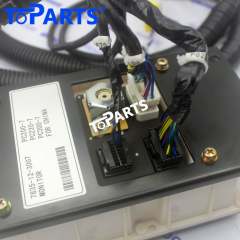


20Y-06-31120 Monitor Wiring Harness for Komatsu PC200-7 PC350-7 PC400-7 PC600-7
If diagnosis has led you to the wiring, the 20Y-06-31120 Monitor Wiring Harness gives you a complete, new harness for Komatsu PC200-7, PC350-7, PC210-7, PC220-7, PC300-7, PC400-7 excavators instead of a patchwork of repairs on old, brittle wire.
Product Details
- Part Name: Monitor Wiring Harness
- Part Number: 20Y-06-31120, 20Y0631120
- Condition: Aftermarket new
- Product Weight: 1.5 kg / 3.31 lbs
- Brand: TOPARTS
- Feature: Matches original routing and length; durable, heat-resistant insulation
Compatible Models
Komatsu PC200-7, PC350-7, PC210-7, PC220-7, PC300-7, PC400-7, etc
How It Works on Your Machine
This part connects the cab monitor to the machine's controllers and power supply. Loose or damaged monitor wiring is a common cause of blank screens, flickering displays and false warnings that have nothing to do with the actual condition of the engine.
The monitor is how the machine talks to the operator: engine temperature, fuel level, warning lights, fault codes and working modes. The wiring and connectors feeding it must stay secure, or the operator loses the information needed to run the machine safely.
Komatsu machines use monitor-based diagnostics, and a harness fault frequently appears as an error code that clears and returns. Replacing worn wiring is a common fix for these recurring codes.
How to Verify Compatibility
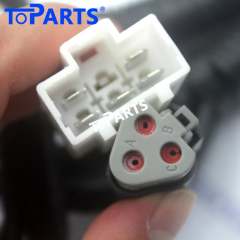
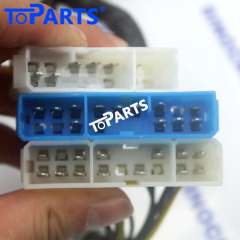
Before ordering, compare the part number printed on the label of your original harness with 20Y-06-31120. It is also worth comparing the connector shapes and the number of branches with our product photos. If your machine's serial range or engine variant differs, send us your machine details and we will confirm compatibility before you buy.
Reducing Downtime
Dealer lead times for wiring harnesses can stretch to weeks. Ordering a replacement in advance, or as soon as faults begin to appear, keeps your project on schedule and avoids rental costs for a substitute machine.
When to Replace It
Common warning signs are:
- Loose or broken connector locks behind the panel
- Display resetting during operation
- Monitor screen blank or flickering
- Gauges or warning lights showing false readings
Intermittent faults like these are classic signs of ageing wiring, and they rarely improve on their own.
Frequently Asked Questions
Is this a genuine or aftermarket part?
Please see the Condition line in the specifications above. Every part is checked for fit and continuity before shipping.
Do I need special tools to install it?
Standard hand tools are usually enough. Labelling connectors and taking photos before removal makes the job much easier.
Is this harness plug-and-play?
Yes. It is built to the original layout with matching connectors, so it installs in place of the original without cutting or splicing.
Installation Guide
- Disconnect the battery before removing the monitor panel.
- Check connector pins for corrosion or damage.
- Make sure each connector clicks fully into its lock.
- Power on and confirm all gauges and indicators before reassembly.
Payment & Shipping
- Payment Method: PayPal, Stripe, Credit card, Visa, etc.
- Shipping Method: DHL, FedEx, UPS, TNT, USPS EMS, etc.
- Track Your Order: An email containing the tracking number with a link will be sent to you as soon as it ships.
Note: Please verify your part number and match our product pictures to your original item before ordering. If you have any questions, please feel free to contact us. Thanks.